No prompt engineering to learn. No models to choose.
AI simply joins your organization, and you talk to it as you would to a person. — An AI server that starts working the moment you connect it.
Don’t learn the tool. Just ask the AI.
Talk to your new AI in your everyday words, just as you would talk to a person — summarize these minutes, file this contract, send this quotation. They take requests in plain words, and work in parallel, as much as you ask.
What miraiGen.™Cube does falls into three kinds.
Everyday work, taken off your hands.
A quotation drawn up from your own template (sample).
Teach the AI your company template once — layout, seal, table style — and from then on you only say the customer, the item and the price. It fills in the template, renders a PDF and files it in the document library. Invoices, delivery notes and any other fixed-format paperwork work the same way.
The download page your client sees (sample). The code goes only to the address registered at issue time.
Sending is the AI’s job too. A download link with a one-time verification code: one email completes the delivery, with no separate password message. Names are checked against your verified address book, and a mis-sent link can be revoked on the spot. Ask, and it will tell you whether the file has been collected.
Deciding which folder it belongs in is the AI’s job. Retrieval is a sentence too — even with same-named copies scattered about, you get the right master. Checking a document out to work on it, and checking it back in, are requests too. Every filing leaves history, and rolling back to an earlier version takes one line.
Transfers between departments travel as formal handovers, with copies kept on both sides. Better still: when a casual chat strays into another department’s territory, the AI itself asks, “Shall I turn this into a handover?” Nothing gets lost in hallway conversation.
The staging preview, minutes after you ask (sample). Check it, say “publish”, and it goes live.
From that one sentence, the AI reads your materials and builds the page — structure, copy and colors. It shows you a staging preview first; say “publish” and it goes live, with who, when and on whose request kept in a ledger. Everyday fixes work the same way. This very site, too, was completed and published through dialogue with miraiGen.™Cube’s AI.
No printer dialogs, no driver settings. In the office, the AI sends the job straight to the company printer; on the road or at home, it hands the file to your PC’s print screen. Which file, which printer, how many copies — confirmed in a single line.
※ Printers without network support cannot be printed to directly. In that case the AI can give you a button that opens your PC’s print screen, so you can print from a printer connected to that PC.
Attach the transcript and ask — that’s all (screen is a sample).
Drag in the transcribed text of your meeting and ask. The AI reads it, sorts decisions, to-dos and owners into proper minutes, and files them in the department library. Want changes? Just say so. Even the long transcripts of long meetings are summarized efficiently.
Examiner vs. inventor, head to head (sample).
For long documents — specifications, contracts — you can summon several agents with opposing roles and let them collide. The examiner probes for weaknesses; the inventor tests whether they can be answered. What reaches your attorney has already been shaken down in-house.
※ AI does not fully substitute for the services of qualified professionals such as patent attorneys. Please consult a professional for final decisions.
3D models arrive mechanically verified (sample).
From dimensions and drawings, the AI shapes the part, machine-checks it — watertight? colliding parts? — and delivers an STL ready for your 3D printer. Tell it how the test print went, and the next version appears.
And — the enclosure of this very miraiGen.™Cube was designed using miraiGen.™Cube.
— Every one of these is a real request that miraiGen.™Cube received and completed.
The more you use it, the better the fit.
— An actual exchange from development (August 2026). The feature shipped exactly so, as the standard in-reply file preview.
Additions and improvements to the product itself can be requested the same way. The AI drafts the change to miraiGen.™Cube, and it takes effect once your administrator approves. After deployment, miraiGen.™Cube keeps growing to fit your company.
The rules you have grown (sample).
— Taught to this miraiGen.™Cube’s own PR AI in October 2026, and honored ever since.
If a reply is not to your liking, flag it and say one line. The correction is recorded as a company rule and takes effect from the next reply. No training sessions, no settings screens. Rules are reviewable in a single list, and from turns of phrase to reporting etiquette, your company’s way of working accumulates.
Who may see what, what comes in from outside, and getting back on your feet.
AI is stationed per department, each with its own document library and permissions — information never blends, and each works in its department’s context. What an AI may do — read other departments’ files, operate equipment — is granted and revoked per department from the admin screen, effective from the very next reply.
The check report and the ranked access attempts your AI compiles (sample).
The AI inspects the externally visible entry points, certificates, shared-folder permissions and password practice, then writes up findings with proposed fixes. Point at what worries you and it digs in — down to the source code. The inspection follows your request.
The AI reads your access logs and ranks what happened: where it came from (with reverse-DNS), where it was aimed, which port, which attack, how many times. Attack names, reference CVE numbers and a suggested response are included, so you can decide what to fix first. The list can also be exported as CSV. Attempts that were refused and probes that did get content back are reported separately (the latter as severity “high”, with a proposed fix to close that path). You decide what gets changed. The AI prepares the proposed configuration change and applies it only once you approve.
Say you asked the AI to change a feature, and the change failed. If — in the unlikely event — the screen freezes so that nothing responds, pressing the button on the miraiGen.™Cube itself wakes the AI.
The AI woken by that button investigates the cause on the spot and repairs it. If the repair does not bring the system back, it returns everything to the state it was in before the change.
And if the unit itself stays unresponsive, or the main server fails physically, pressing the button on the backup miraiGen.™Cube promotes the backup unit to main server once the state of the main server has been confirmed. Once it has been promoted, you simply install a new miraiGen.™Cube: it recognises the new main server by itself and starts running as the backup unit on its own. Several layers of safety keep the system protected — with no maintenance staff on site. (Patent pending)
* If none of these safeguards restores the system, recovery by the user alone may not be possible. Should you need the data rescued in such a case, asking a PC repair business may make recovery of your data possible.
And it writes without being asked. Each time a piece of work wraps up, the AI adds a one-line note to a company-wide progress sheet. No status meetings for the sake of status — the whole company, on one page.
And no fear of overuse. Usage and an AI cost estimate (on API plans) are always displayed in the browser workspace. You can see it, so you can trust it.
The real usage display (sample) — always in the corner of the workspace.
And if the worst happens. A two-unit setup — main server plus backup. Your data is backed up automatically every day. Even when the business screen stops responding, a separate entrance stays available, and the AI on the platform side can be asked to restore the system.
And on a schedule. Daily, weekly or monthly routines can be handed over with a set time — a draft of the Monday report, the monthly figures, a draft post for your website, and the security check. They are done before you sit down.
And you can walk away. If you are asked “may I run this?” at every step, you can never leave your desk. miraiGen.™Cube keeps everyday work moving and stops only just before anything that cannot be undone — deleting a file, sending something outside the company, publishing a web page. Unless you have allowed it in advance, it always asks first. How much you delegate is set by your administrator, department by department.
What you have seen here is only a fraction.
How far it goes depends on how you use it.
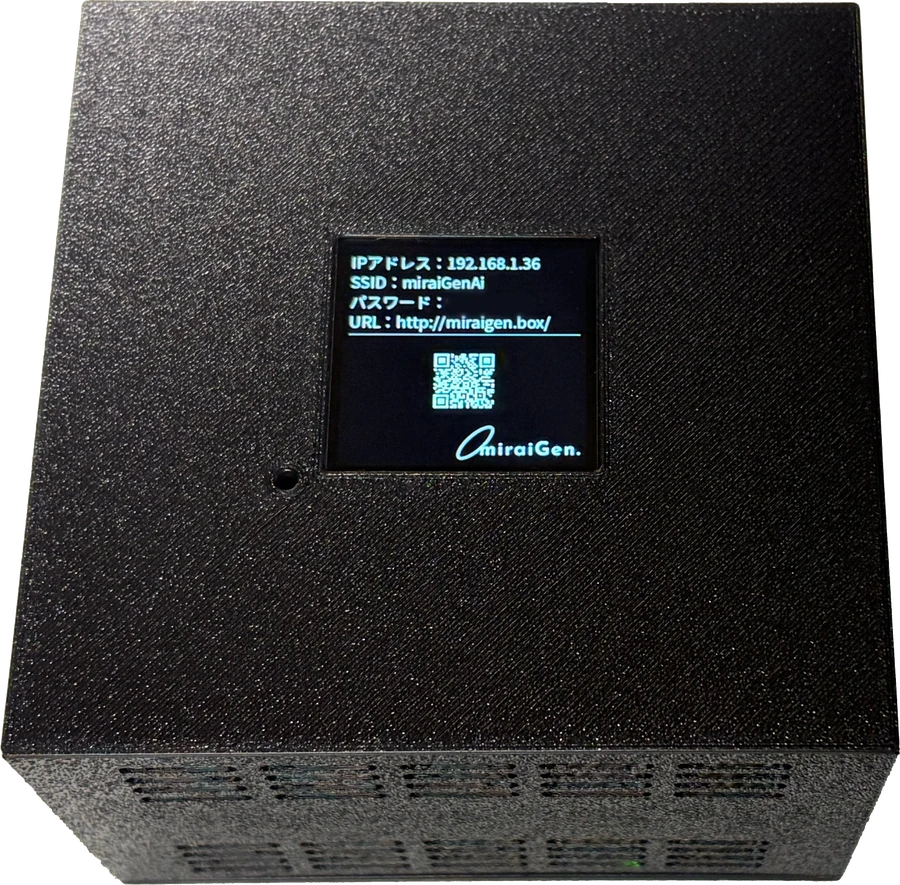
miraiGen.™Cube is a palm-sized AI business-platform server. Documents, histories, handover receipts — all of it is stored on this unit, inside your office. Your business data is never entrusted to an external cloud.
Place the box. Connect power and LAN.
No construction work, no setup PC.※1
Connect your smartphone, and a guide screen opens.
Your first AI is waiting there.※2
From there, it is conversation.
Organization setup through account distribution — completed in dialogue with the AI.
※1 Setting it up from a PC is also possible.
※2 A Claude token must be entered during setup. See the manual for details.
Planned, built and published in dialogue with miraiGen.™Cube’s AI.
The site you are reading was built by the AI PR department working inside miraiGen.™Cube, and went live on the single word “publish”. You have just finished reading a working sample of this product.
The Cube doubles as a web server; our sites are served from miraiGen.™Cube. The AI that builds and the server that delivers share a single box.
No. Connect power and LAN, connect your smartphone, and a guide screen opens; everything from organization setup to handing out accounts is completed in dialogue with the AI. Note that a Claude token must be entered during setup (see the manual).
Five differences stand out.
· Several people in the company use it, each with their own account. Each department gets its own AI, with its own document store and its own permissions.
· You ask in a browser chat. No knowledge of VS Code is needed — you ask in the words you would use with a colleague.
· You do not approve each command. The administrator decides per department what the AI may do, and within that the AI proceeds on its own (it checks with you before irreversible actions such as deleting files). You do not have to sit and watch the screen.
· If a result is wrong, you can go back one step. Documents keep a history every time they are filed, and a single line rolls them back. Changes to the system itself can be rolled back the same way.
· It runs on a server, so it does not tie you to one PC. With a browser you pick up where you left off, at the office or away from it.
Documents, histories and handover receipts are all stored on the unit inside your office; nothing is entrusted to an external cloud. Only AI response generation uses the Anthropic (US) API — see the note at the end of this page.
We cannot promise it never does. As with people, instructions can slip when an exchange runs long. If something you asked for is not being followed, say so — “we agreed on X, and it is not being done.” The AI looks the agreement up again and proceeds more carefully, and it may propose a way to stop it happening again.
Anything you do not want to repeat can be recorded as a company rule. Recorded rules take effect from the next reply and carry over even when the person in charge changes.
The AI will not be able to answer. Your files, however, remain available: the unit also appears as a network drive, so you can open and take out your documents from your PC.
The miraiGen.™Cube unit itself is a one-time purchase, and there is no monthly fee for the hardware. A separate AI (Claude) subscription is required, however. AI usage runs on either a flat-rate plan or pay-as-you-go, with usage and cost estimates always visible in the browser workspace.
Either works. By default miraiGen.™Cube serves the site itself; if you use external hosting, adding the connection settings lets you ask in exactly the same way.
Almost everything — but these three steps must be arranged outside miraiGen.™Cube.
Everything else is completed inside miraiGen.™Cube.
It can. That said, if you already have mail in service, we do not recommend migrating it.
Most of it — but these steps must be arranged outside miraiGen.™Cube.
Everything else is completed inside miraiGen.™Cube.
Much as with a human colleague, it depends on how you ask. Fixed-format work such as a quotation is usually right first time. Work that rests on taste — the design of a web page, say — invites a few rounds of “a little brighter”, “make this photo larger”. Corrections are given in plain words, so that back-and-forth is simply how the work proceeds.
Nothing goes out without a person’s approval. Sites are reviewed on staging before you say “publish”; documents keep full version history and can be rolled back at any time.
Yes. Mark a record as confidential and your colleagues in the department cannot see it. Your organization’s administrator can — and that record always shows the fact that a confidentiality mark is on it (who, and when), so the administrator has that context when handling the information. Maintenance staff (the technical role) see neither the content nor its existence: it appears in no title, count, list or notification.
The AI makes no promise it cannot keep. Before marking, it states the limit — “I will record this as not to be disclosed to colleagues, but I cannot resist a disclosure request from the administrator” — and only proceeds once you agree. If you do not agree, you choose there and then whether to abandon the record altogether or to keep it without the confidentiality mark. The mark is held as management data attached to the record itself, not as part of the conversation, so it does not lapse when a long conversation is summarized. Maintenance staff are shown no records at all by default rather than having confidential ones hidden — otherwise a gap in a list or a difference in counts would reveal that hidden records exist. When access is genuinely needed, it happens alongside the administrator or under temporary permission granted by them, and that access is recorded too.
Access records are chained — each line contains the hash of the previous one — and replicated one-way, with generations, to a separate unit. They cannot be erased from the unit itself. What we claim is not “nobody can see it” but “if it is seen, that is recorded, and if the record is erased, the erasure shows”.
Only genuine units issued by us are taken in as a backup unit. Each unit’s certificate is tied to a key held inside that unit, so copying it to another unit does not work. A unit that cannot be verified is not taken in automatically; an administrator has to approve it by pressing a button on the unit. In either case the request, and whether it was approved or refused, is recorded and the administrator is notified. Copying of data begins only after approval.
It is not limited to companies. Think of it as a shared place where several people get work done together — a shop, a classroom, a team, a small practice. Read “department” as “floor”, “class” or “crew”, and everything works the same way.
Three configurations are available: up to 10, 30 or 100 users.
The system is designed so that the licensed number of people can all be registered and use it. It is not, however, designed for every registered user to run at full load simultaneously and continuously.
In ordinary office work, only a portion of staff are at their computers at any moment, and only a fraction of those are asking the server to do something at the very same instant. This product uses computing resources only while the AI is actually working and releases them as soon as it finishes, so in normal office use alongside other work it performs without trouble.
When there is no spare capacity, requests simply queue and are processed after a short wait. They do not fail with an error.
Asking the AI to modify the system itself runs as a sustained job lasting several minutes, during which other work may feel slower. Such modifications are carried out one at a time, in order.
Three price tiers by number of users, plus add-on single units.
Distributor and sales-partner inquiries are welcome too.
† Intended as an add-on backup unit. It can also be used as a single-unit configuration, but automatic backup is not available.
Prices are for the Japanese domestic market. For sales outside Japan, please contact us.
The product is not yet on sale, so the prices shown are planned prices. The release date and the final prices will be announced on this page. No monthly system fee. Setup support and maintenance are not included (available separately). Licensed users = the maximum number of users.
To the inquiry formPlease choose “AI Business Platform miraiGen Cube” as the inquiry type.